
diff options
Diffstat (limited to 'keyboards/kc60/keymaps/noroadsleft/readme.md')
| -rw-r--r-- | keyboards/kc60/keymaps/noroadsleft/readme.md | 132 |
1 files changed, 118 insertions, 14 deletions
diff --git a/keyboards/kc60/keymaps/noroadsleft/readme.md b/keyboards/kc60/keymaps/noroadsleft/readme.md index 59f4386ee..8d0c6547a 100644 --- a/keyboards/kc60/keymaps/noroadsleft/readme.md +++ b/keyboards/kc60/keymaps/noroadsleft/readme.md | |||
| @@ -1,15 +1,15 @@ | |||
| 1 | # @noroadsleft's KC60 keymap | 1 | # @noroadsleft's KC60 keymap |
| 2 | 2 | ||
| 3 | ### Last updated: November 5, 2019, 12:07 AM UTC-0800 | 3 | ### Last updated: April 26, 2021 13:33 (-0700) |
| 4 | 4 | ||
| 5 |  | 5 |  |
| 6 | 6 | ||
| 7 | I am a full-time Dvorak typist, and occasional semi-serious FPS gamer. The layers are oriented towards a mix of typing and gaming. | 7 | I am a full-time Dvorak typist, and occasional semi-serious FPS gamer. The layers are oriented towards a mix of typing and gaming. |
| 8 | 8 | ||
| 9 | 9 | ||
| 10 | ---- | 10 | ---- |
| 11 | 11 | ||
| 12 | # Preface | 12 | ## Preface |
| 13 | 13 | ||
| 14 | Images in this readme follow the following format: | 14 | Images in this readme follow the following format: |
| 15 | 15 | ||
| @@ -21,18 +21,122 @@ Descriptions of the physical locations of keys will use the key's function in a | |||
| 21 | 21 | ||
| 22 | ---- | 22 | ---- |
| 23 | 23 | ||
| 24 | # Outline | 24 | ## Outline |
| 25 | 25 | ||
| 26 | - [Base Layers](./readme_ch1.md) | 26 | - [Base Layers](#base-layers) |
| 27 | - Layer 0: QWERTY `_QW` | 27 | - Layer 0: QWERTY `_QW` |
| 28 | - Layer 1: Hardware Dvorak `_DV` | 28 | - Layer 1: Hardware Dvorak `_DV` |
| 29 | - Layer 2: Hardware Colemak `_CM` | 29 | - Layer 2: Hardware Colemak `_CM` |
| 30 | - [Quake 2 Overlays](./readme_ch2.md) | 30 | - [Quake 2 Layer](#quake-2-layer) |
| 31 | - Layers 3, 4 and 5: Quake 2 `_Q2`, Quake 2 Dvorak `_QD`, and Quake 2 Console `_QC` | 31 | - Layer 3: Quake 2 `_Q2` |
| 32 | - [Function Layers](./readme_ch3.md) | 32 | - [Function Layer](#function-layer) |
| 33 | - Layer 6: Fn layer `_FN` | 33 | - Layer 4: Fn layer `_FN` |
| 34 | - Layer 7: Quake 2 Fn layer `_FQ` | 34 | - [Other Layers](#other-layers) |
| 35 | - [Other Layers](./readme_ch4.md) | 35 | - Layer 5: Numpad layer `_NP` |
| 36 | - Layer 8: Numpad layer `_NP` | 36 | - Layer 6: Macro layer `_MA` |
| 37 | - Layer 9: Macro layer `_MA` | 37 | - Layer 7: System layer `_SY` |
| 38 | - Layer 10: System layer `_SY` | 38 | |
| 39 | |||
| 40 | ---- | ||
| 41 | |||
| 42 | ## Base Layers | ||
| 43 | |||
| 44 | ### Layer 0: QWERTY - `_QW` | ||
| 45 | |||
| 46 | Standard QWERTY layout, with four QMK features: | ||
| 47 | |||
| 48 | - The `Menu` key has been replaced by `MO(_FW)`, which moves to my Windows Fn layer when held. | ||
| 49 | - The Right `GUI` key has been replaced with a `MO(_MA)` key, which moves to the Macro layer when held. | ||
| 50 | - The `Caps Lock` key has been replaced with a dual function `LT()` key, which opens the Windows Fn layer when held, and is `Caps Lock` when tapped | ||
| 51 | - The Left `Control` key has been replaced with a `MT(MOD_CTRL, KC_GRV)` key, which is <code>` ~</code> when tapped and `Ctrl` when held. | ||
| 52 | |||
| 53 | 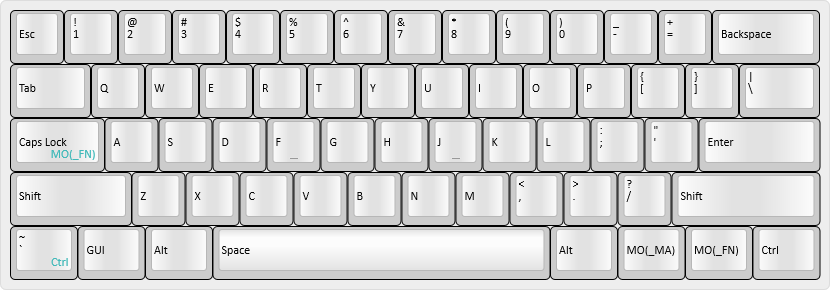 | ||
| 54 | |||
| 55 | |||
| 56 | ---- | ||
| 57 | |||
| 58 | ### Layer 1: Hardware Dvorak - `_DV` | ||
| 59 | |||
| 60 | - Accessed by holding either `Fn` and tapping `/?` key, then tapping `2@`. | ||
| 61 | |||
| 62 | A hardware-based Dvorak Simplified layout. At my weekend job, I use a shared computer that runs MacOS Sierra, in US QWERTY layout. In this layer, I can leave the system in QWERTY, plug my keyboard in, and still type in Dvorak. | ||
| 63 | |||
| 64 | 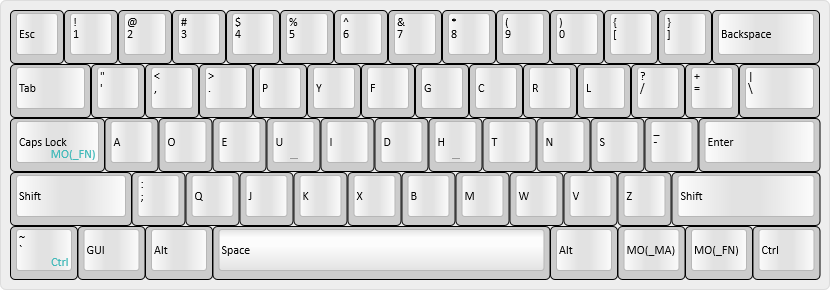 | ||
| 65 | |||
| 66 | |||
| 67 | ---- | ||
| 68 | |||
| 69 | ### Layer 2: Hardware Colemak `_CM` | ||
| 70 | |||
| 71 | - Accessed by holding either `Fn` and tapping `/?` key, then tapping `3#`. | ||
| 72 | |||
| 73 | A hardware-based Colemak layout. Been thinking of trying it, so it's here. | ||
| 74 | |||
| 75 | 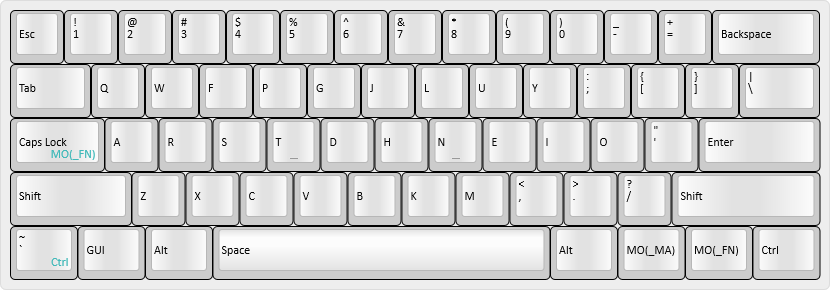 | ||
| 76 | |||
| 77 | |||
| 78 | ---- | ||
| 79 | |||
| 80 | ## Quake 2 Layer | ||
| 81 | |||
| 82 | ### Layer 3: Quake 2 `_Q2` | ||
| 83 | |||
| 84 | - Accessed by holding either `Fn` key and tapping the `/?` key, then tapping `4$` | ||
| 85 | |||
| 86 | These layers were born out of the confusion I have had trying to use the in-game chat and the console in [Quake 2](https://en.wikipedia.org/wiki/Quake_II). When Quake 2 came out, alternate keyboard layouts weren't really a thing. As a result, all in-game text input is hard-locked to US QWERTY, regardless of what the operating system is using for its input method. | ||
| 87 | |||
| 88 | I have solved this by writing a custom QMK macro. The keycode in the System layer that enables these layers, [`GO_Q2`](./keymap.c#L205), is a [macro](./keymap.c#L63-L70) that sets the default layer to the QWERTY layer, then turns the Quake 2 layer `_Q2` on. The result is a partially-overwritten QWERTY layer, that changes the dual-function Left Control/Grave key to a standard Left Control, and the Enter key into a special Enter key specific to Quake 2. | ||
| 89 | |||
| 90 | When I hit the `Enter` key (bound in-game to text chat), the [macro keycode](./keymap.c#L71-L86) I've created sends the keycode for `Enter`, then follows with flipping an internal boolean variable and enabling the Hardware Dvorak layer. Now the game is in text chat mode, and my keyboard is in Dvorak. When I hit `Enter` again, another `Enter` key is sent, which sends the message, then the macro flips the boolean back to false and disables the Hardware Dvorak layer, which brings me back to the standard QWERTY+Quake 2 setup. Hitting `Escape` instead runs a [macro](./keymap.c#L87-L97) that cancels the sending of the message, and undoes the layers. | ||
| 91 | |||
| 92 | 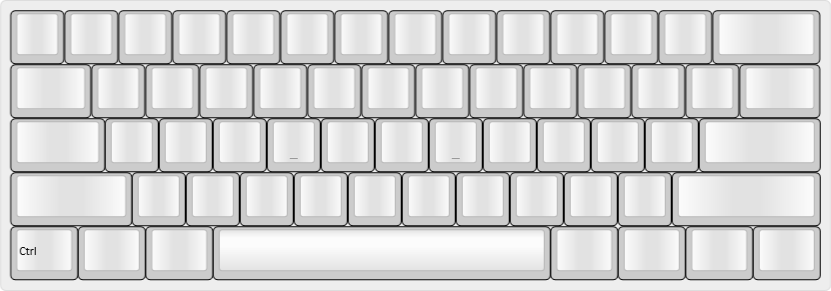 | ||
| 93 | |||
| 94 | |||
| 95 | ---- | ||
| 96 | |||
| 97 | ## Function Layer | ||
| 98 | |||
| 99 | ### Layer 4: Fn layer - `_FN` | ||
| 100 | |||
| 101 | - Accessed by holding either `Fn` key from any base layer | ||
| 102 | |||
| 103 | Arrows, Navigation keys (Insert, Home, Page Up, etc.), and Function keys are here. Also has keys for Calculator, Menu, Volume Control, and shortcuts for Select All, Undo, Cut, Copy, and Paste. Numpad Enter for when I'm working in Adobe Photoshop, because it treats Numpad Enter differently from the regular Enter key. | ||
| 104 | |||
| 105 | 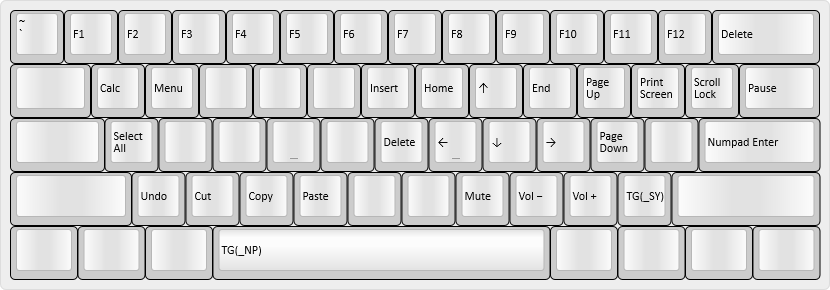 | ||
| 106 | |||
| 107 | |||
| 108 | ---- | ||
| 109 | |||
| 110 | ## Other Layers | ||
| 111 | |||
| 112 | ### Layer 5: Numpad layer - `_NP` | ||
| 113 | |||
| 114 | - Accessed by holding either `Fn` key and tapping `Space`, from any of the Base Layers | ||
| 115 | |||
| 116 | Puts a Numpad on the right-hand side of the keyboard. A through F included for hexadecimal input. Tapping `Space` returns to the previous Base Layer. | ||
| 117 | |||
| 118 | 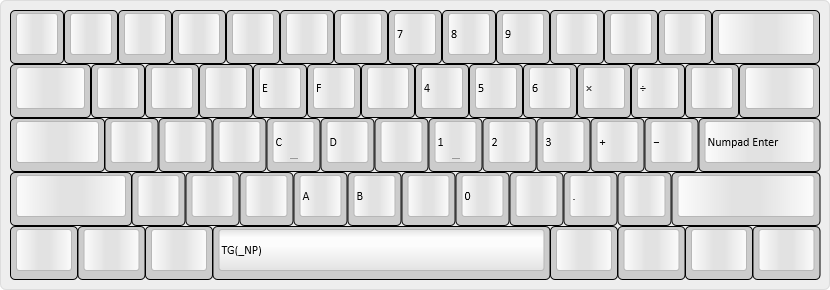 | ||
| 119 | |||
| 120 | |||
| 121 | ---- | ||
| 122 | |||
| 123 | ### Layer 6: Macro layer - `_MA` | ||
| 124 | |||
| 125 | - Accessed by holding the right-side `Win` key | ||
| 126 | |||
| 127 | Has some macros that I use in Git, and keys for use with the [Dynamic Macros feature](https://docs.qmk.fm/#/feature_dynamic_macros). | ||
| 128 | |||
| 129 | For macro documentation, see [my userspace readme](../../../../users/noroadsleft/readme.md). | ||
| 130 | |||
| 131 | 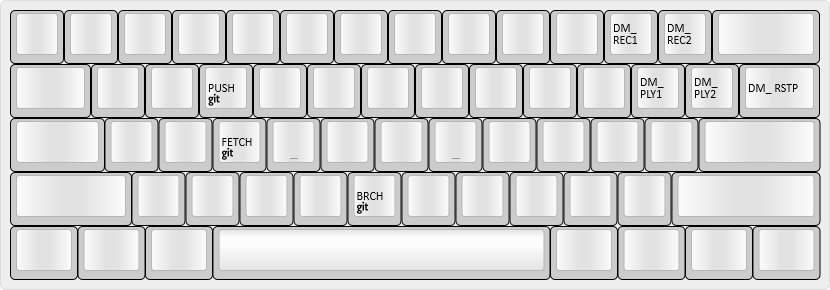 | ||
| 132 | |||
| 133 | |||
| 134 | ---- | ||
| 135 | |||
| 136 | ### Layer 7: System layer - `_SY` | ||
| 137 | |||
| 138 | - Accessed by holding either `Fn` key and tapping the `/?` key | ||
| 139 | |||
| 140 | This is where I change my keyboard function. Base layer select on `1` through `4`, Backlight controls on `C` through `N`, Reset on `8*`, Debug on `0)`. Hitting `Esc` exits the layer. | ||
| 141 | |||
| 142 | 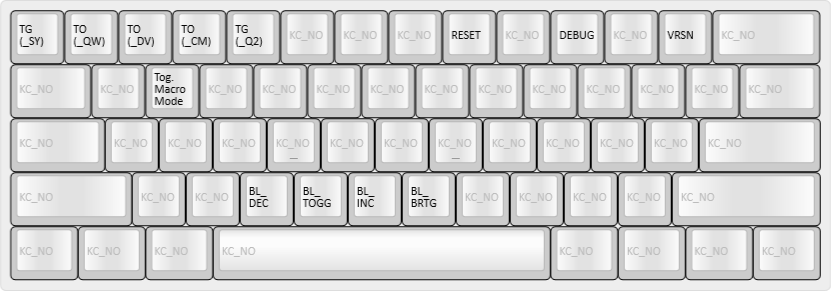 | ||