
diff options
| author | Jack Humbert <jack.humb@gmail.com> | 2016-02-07 10:38:57 -0500 |
|---|---|---|
| committer | Jack Humbert <jack.humb@gmail.com> | 2016-02-07 10:38:57 -0500 |
| commit | 5dc0d1dc20ecb36ac0295a409769c3e4c3f1e815 (patch) | |
| tree | 14e84ad8b922d89b37b58489c6e297b82a84af3e | |
| parent | 7d6716beded4a60cd9de24e95d8ec60694692b6f (diff) | |
| download | qmk_firmware-5dc0d1dc20ecb36ac0295a409769c3e4c3f1e815.tar.gz qmk_firmware-5dc0d1dc20ecb36ac0295a409769c3e4c3f1e815.zip | |
README changes
| -rw-r--r-- | README.md | 25 | ||||
| -rw-r--r-- | keyboard/planck/README.md | 156 |
2 files changed, 23 insertions, 158 deletions
| @@ -138,9 +138,9 @@ Note: Using macros to have your keyboard send passwords for you is a bad idea. | |||
| 138 | 138 | ||
| 139 | Everything is assuming you're in Qwerty (in software) by default, but there is built-in support for using a Colemak or Dvorak layout by including this at the top of your keymap: | 139 | Everything is assuming you're in Qwerty (in software) by default, but there is built-in support for using a Colemak or Dvorak layout by including this at the top of your keymap: |
| 140 | 140 | ||
| 141 | #include "keymap_<layout>.h" | 141 | #include <keymap_extras/keymap_colemak.h> |
| 142 | 142 | ||
| 143 | Where <layout> is "colemak" or "dvorak". After including this line, you will get access to: | 143 | If you use Dvorak, use `keymap_dvorak.h` instead of `keymap_colemak.h` for this line. After including this line, you will get access to: |
| 144 | 144 | ||
| 145 | * `CM_*` for all of the Colemak-equivalent characters | 145 | * `CM_*` for all of the Colemak-equivalent characters |
| 146 | * `DV_*` for all of the Dvorak-equivalent characters | 146 | * `DV_*` for all of the Dvorak-equivalent characters |
| @@ -228,3 +228,24 @@ The firmware supports 5 different light effects, and the color (hue, saturation, | |||
| 228 | 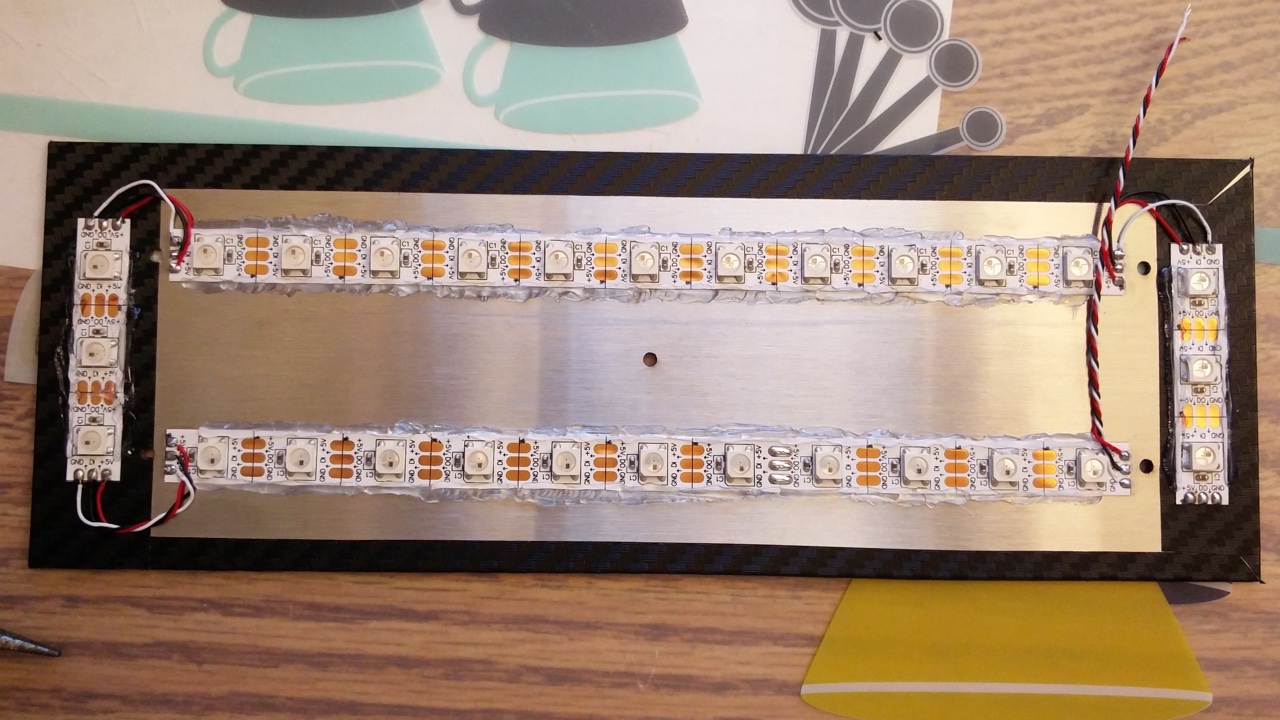 | 228 |  |
| 229 | 229 | ||
| 230 | Please note the USB port can only supply a limited amount of power to the keyboard (500mA by standard, however, modern computer and most usb hubs can provide 700+mA.). According to the data of NeoPixel from Adafruit, 30 WS2812 LEDs require a 5V 1A power supply, LEDs used in this mod should not more than 20. | 230 | Please note the USB port can only supply a limited amount of power to the keyboard (500mA by standard, however, modern computer and most usb hubs can provide 700+mA.). According to the data of NeoPixel from Adafruit, 30 WS2812 LEDs require a 5V 1A power supply, LEDs used in this mod should not more than 20. |
| 231 | |||
| 232 | ## Safety Considerations | ||
| 233 | |||
| 234 | You probably don't want to "brick" your keyboard, making it impossible | ||
| 235 | to rewrite firmware onto it. Here are some of the parameters to show | ||
| 236 | what things are (and likely aren't) too risky. | ||
| 237 | |||
| 238 | - If a keyboard map does not include RESET, then, to get into DFU | ||
| 239 | mode, you will need to press the reset button on the PCB, which | ||
| 240 | requires unscrewing some bits. | ||
| 241 | - Messing with tmk_core / common files might make the keyboard | ||
| 242 | inoperable | ||
| 243 | - Too large a .hex file is trouble; `make dfu` will erase the block, | ||
| 244 | test the size (oops, wrong order!), which errors out, failing to | ||
| 245 | flash the keyboard | ||
| 246 | - DFU tools do /not/ allow you to write into the bootloader (unless | ||
| 247 | you throw in extra fruitsalad of options), so there is little risk | ||
| 248 | there. | ||
| 249 | - EEPROM has around a 100000 write cycle. You shouldn't rewrite the | ||
| 250 | firmware repeatedly and continually; that'll burn the EEPROM | ||
| 251 | eventually. | ||
diff --git a/keyboard/planck/README.md b/keyboard/planck/README.md index 5c3a52498..0340a6650 100644 --- a/keyboard/planck/README.md +++ b/keyboard/planck/README.md | |||
| @@ -4,163 +4,7 @@ DIY/Assembled compact ortholinear 40% keyboard by [Ortholinear Keyboards](http:/ | |||
| 4 | 4 | ||
| 5 | ## Quantum MK Firmware | 5 | ## Quantum MK Firmware |
| 6 | 6 | ||
| 7 | You have access to a bunch of goodies! Check out the Makefile to enable/disable some of the features. Uncomment the `#` to enable them. Setting them to `no` does nothing and will only confuse future you. | ||
| 8 | 7 | ||
| 9 | BACKLIGHT_ENABLE = yes # Enable keyboard backlight functionality | ||
| 10 | MIDI_ENABLE = yes # MIDI controls | ||
| 11 | # UNICODE_ENABLE = yes # Unicode support - this is commented out, just as an example. You have to use #, not // | ||
| 12 | BLUETOOTH_ENABLE = yes # Enable Bluetooth with the Adafruit EZ-Key HID | ||
| 13 | |||
| 14 | ## Quick aliases to common actions | ||
| 15 | |||
| 16 | Your keymap can include shortcuts to common operations (called "function actions" in tmk). | ||
| 17 | |||
| 18 | ### Switching and toggling layers | ||
| 19 | |||
| 20 | `MO(layer)` - momentary switch to *layer*. As soon as you let go of the key, the layer is deactivated and you pop back out to the previous layer. When you apply this to a key, that same key must be set as `KC_TRNS` on the destination layer. Otherwise, you won't make it back to the original layer when you release the key (and you'll get a keycode sent). You can only switch to layers *above* your current layer. If you're on layer 0 and you use `MO(1)`, that will switch to layer 1 just fine. But if you include `MO(3)` on layer 5, that won't do anything for you -- because layer 3 is lower than layer 5 on the stack. | ||
| 21 | |||
| 22 | `LT(layer, kc)` - momentary switch to *layer* when held, and *kc* when tapped. Like `MO()`, this only works upwards in the layer stack (`layer` must be higher than the current layer). | ||
| 23 | |||
| 24 | `TG(layer)` - toggles a layer on or off. As with `MO()`, you should set this key as `KC_TRNS` in the destination layer so that tapping it again actually toggles back to the original layer. Only works upwards in the layer stack. | ||
| 25 | |||
| 26 | ### Fun with modifier keys | ||
| 27 | |||
| 28 | * `LSFT(kc)` - applies left Shift to *kc* (keycode) - `S(kc)` is an alias | ||
| 29 | * `RSFT(kc)` - applies right Shift to *kc* | ||
| 30 | * `LCTL(kc)` - applies left Control to *kc* | ||
| 31 | * `RCTL(kc)` - applies right Control to *kc* | ||
| 32 | * `LALT(kc)` - applies left Alt to *kc* | ||
| 33 | * `RALT(kc)` - applies right Alt to *kc* | ||
| 34 | * `LGUI(kc)` - applies left GUI (command/win) to *kc* | ||
| 35 | * `RGUI(kc)` - applies right GUI (command/win) to *kc* | ||
| 36 | |||
| 37 | You can also chain these, like this: | ||
| 38 | |||
| 39 | LALT(LCTL(KC_DEL)) -- this makes a key that sends Alt, Control, and Delete in a single keypress. | ||
| 40 | |||
| 41 | The following shortcuts automatically add `LSFT()` to keycodes to get commonly used symbols. Their long names are also available and documented in `/quantum/keymap_common.h`. | ||
| 42 | |||
| 43 | KC_TILD ~ | ||
| 44 | KC_EXLM ! | ||
| 45 | KC_AT @ | ||
| 46 | KC_HASH # | ||
| 47 | KC_DLR $ | ||
| 48 | KC_PERC % | ||
| 49 | KC_CIRC ^ | ||
| 50 | KC_AMPR & | ||
| 51 | KC_ASTR * | ||
| 52 | KC_LPRN ( | ||
| 53 | KC_RPRN ) | ||
| 54 | KC_UNDS _ | ||
| 55 | KC_PLUS + | ||
| 56 | KC_LCBR { | ||
| 57 | KC_RCBR } | ||
| 58 | KC_PIPE | | ||
| 59 | KC_COLN : | ||
| 60 | |||
| 61 | `MT(mod, kc)` - is *mod* (modifier key - MOD_LCTL, MOD_LSFT) when held, and *kc* when tapped. In other words, you can have a key that sends Esc (or the letter O or whatever) when you tap it, but works as a Control key or a Shift key when you hold it down. | ||
| 62 | |||
| 63 | These are the values you can use for the `mod` in `MT()` (right-hand modifiers are not available): | ||
| 64 | |||
| 65 | * MOD_LCTL | ||
| 66 | * MOD_LSFT | ||
| 67 | * MOD_LALT | ||
| 68 | * MOD_LGUI | ||
| 69 | |||
| 70 | These can also be combined like `MOD_LCTL | MOD_LSFT` e.g. `MT(MOD_LCTL | MOD_LSFT, KC_ESC)` which would activate Control and Shift when held, and send Escape when tapped. | ||
| 71 | |||
| 72 | We've added shortcuts to make common modifier/tap (mod-tap) mappings more compact: | ||
| 73 | |||
| 74 | * `CTL_T(kc)` - is LCTL when held and *kc* when tapped | ||
| 75 | * `SFT_T(kc)` - is LSFT when held and *kc* when tapped | ||
| 76 | * `ALT_T(kc)` - is LALT when held and *kc* when tapped | ||
| 77 | * `GUI_T(kc)` - is LGUI when held and *kc* when tapped | ||
| 78 | * `ALL_T(kc)` - is Hyper (all mods) when held and *kc* when tapped. To read more about what you can do with a Hyper key, see [this blog post by Brett Terpstra](http://brettterpstra.com/2012/12/08/a-useful-caps-lock-key/) | ||
| 79 | |||
| 80 | ### Temporarily setting the default layer | ||
| 81 | |||
| 82 | `DF(layer)` - sets default layer to *layer*. The default layer is the one at the "bottom" of the layer stack - the ultimate fallback layer. This currently does not persist over power loss. When you plug the keyboard back in, layer 0 will always be the default. It is theoretically possible to work around that, but that's not what `DF` does. | ||
| 83 | |||
| 84 | ### Remember: These are just aliases | ||
| 85 | |||
| 86 | These functions work the same way that their `ACTION_*` functions do - they're just quick aliases. To dig into all of the tmk ACTION_* functions, please see the [TMK documentation](https://github.com/jackhumbert/qmk_firmware/blob/master/tmk_core/doc/keymap.md#2-action). | ||
| 87 | |||
| 88 | Instead of using `FNx` when defining `ACTION_*` functions, you can use `F(x)` - the benefit here is being able to use more than 32 function actions (up to 4096), if you happen to need them. | ||
| 89 | |||
| 90 | ## Macro shortcuts: Send a whole string when pressing just one key | ||
| 91 | |||
| 92 | Instead of using the `ACTION_MACRO` function, you can simply use `M(n)` to access macro *n* - *n* will get passed into the `action_get_macro` as the `id`, and you can use a switch statement to trigger it. This gets called on the keydown and keyup, so you'll need to use an if statement testing `record->event.pressed` (see keymaps/default.c). | ||
| 93 | |||
| 94 | ```c | ||
| 95 | const macro_t *action_get_macro(keyrecord_t *record, uint8_t id, uint8_t opt) // this is the function signature -- just copy/paste it into your keymap file as it is. | ||
| 96 | { | ||
| 97 | switch(id) { | ||
| 98 | case 0: // this would trigger when you hit a key mapped as M(0) | ||
| 99 | if (record->event.pressed) { | ||
| 100 | return MACRO( I(255), T(H), T(E), T(L), T(L), W(255), T(O), END ); // this sends the string 'hello' when the macro executes | ||
| 101 | } | ||
| 102 | break; | ||
| 103 | } | ||
| 104 | return MACRO_NONE; | ||
| 105 | }; | ||
| 106 | ``` | ||
| 107 | A macro can include the following commands: | ||
| 108 | |||
| 109 | * I() change interval of stroke in milliseconds. | ||
| 110 | * D() press key. | ||
| 111 | * U() release key. | ||
| 112 | * T() type key(press and release). | ||
| 113 | * W() wait (milliseconds). | ||
| 114 | * END end mark. | ||
| 115 | |||
| 116 | So above you can see the stroke interval changed to 255ms between each keystroke, then a bunch of keys being typed, waits a while, then the macro ends. | ||
| 117 | |||
| 118 | Note: Using macros to have your keyboard send passwords for you is a bad idea. | ||
| 119 | |||
| 120 | ### Additional keycode aliases for software-implemented layouts (Colemak, Dvorak, etc) | ||
| 121 | |||
| 122 | Everything is assuming you're in Qwerty (in software) by default, but there is built-in support for using a Colemak or Dvorak layout by including this at the top of your keymap: | ||
| 123 | |||
| 124 | #include "keymap_<layout>.h" | ||
| 125 | |||
| 126 | Where <layout> is "colemak" or "dvorak". After including this line, you will get access to: | ||
| 127 | |||
| 128 | * `CM_*` for all of the Colemak-equivalent characters | ||
| 129 | * `DV_*` for all of the Dvorak-equivalent characters | ||
| 130 | |||
| 131 | These implementations assume you're using Colemak or Dvorak on your OS, not on your keyboard - this is referred to as a software-implemented layout. If your computer is in Qwerty and your keymap is in Colemak or Dvorak, this is referred to as a firmware-implemented layout, and you won't need these features. | ||
| 132 | |||
| 133 | To give an example, if you're using software-implemented Colemak, and want to get an `F`, you would use `CM_F` - `KC_F` under these same circumstances would result in `T`. | ||
| 134 | |||
| 135 | ## Additional language support | ||
| 136 | |||
| 137 | In `quantum/keymap_extras/`, you'll see various language files - these work the same way as the alternative layout ones do. Most are defined by their two letter country/language code followed by an underscore and a 4-letter abbreviation of its name. `FR_UGRV` which will result in a `ù` when using a software-implemented AZERTY layout. It's currently difficult to send such characters in just the firmware (but it's being worked on - see Unicode support). | ||
| 138 | |||
| 139 | ## Unicode support | ||
| 140 | |||
| 141 | You can currently send 4 hex digits with your OS-specific modifier key (RALT for OSX with the "Unicode Hex Input" layout) - this is currently limited to supporting one OS at a time, and requires a recompile for switching. 8 digit hex codes are being worked on. The keycode function is `UC(n)`, where *n* is a 4 digit hexidecimal. Enable from the Makefile. | ||
| 142 | |||
| 143 | ## Other firmware shortcut keycodes | ||
| 144 | |||
| 145 | * `RESET` - puts the MCU in DFU mode for flashing new firmware (with `make dfu`) | ||
| 146 | * `DEBUG` - the firmware into debug mode - you'll need hid_listen to see things | ||
| 147 | * `BL_ON` - turns the backlight on | ||
| 148 | * `BL_OFF` - turns the backlight off | ||
| 149 | * `BL_<n>` - sets the backlight to level *n* | ||
| 150 | * `BL_INC` - increments the backlight level by one | ||
| 151 | * `BL_DEC` - decrements the backlight level by one | ||
| 152 | * `BL_TOGG` - toggles the backlight | ||
| 153 | * `BL_STEP` - steps through the backlight levels | ||
| 154 | |||
| 155 | Enable the backlight from the Makefile. | ||
| 156 | |||
| 157 | ## MIDI functionalty | ||
| 158 | |||
| 159 | This is still a WIP, but check out `quantum/keymap_midi.c` to see what's happening. Enable from the Makefile. | ||
| 160 | |||
| 161 | ## Bluetooth functionality | ||
| 162 | |||
| 163 | This requires [some hardware changes](https://www.reddit.com/r/MechanicalKeyboards/comments/3psx0q/the_planck_keyboard_with_bluetooth_guide_and/?ref=search_posts), but can be enabled via the Makefile. The firmware will still output characters via USB, so be aware of this when charging via a computer. It would make sense to have a switch on the Bluefruit to turn it off at will. | ||
| 164 | 8 | ||
| 165 | ## Building | 9 | ## Building |
| 166 | 10 | ||