
diff options
| -rw-r--r-- | keyboards/clueboard/readme.md | 102 | ||||
| -rw-r--r-- | keyboards/cluecard/readme.md | 31 | ||||
| -rw-r--r-- | keyboards/cluepad/readme.md | 17 |
3 files changed, 33 insertions, 117 deletions
diff --git a/keyboards/clueboard/readme.md b/keyboards/clueboard/readme.md index 4a76e2908..95b69befc 100644 --- a/keyboards/clueboard/readme.md +++ b/keyboards/clueboard/readme.md | |||
| @@ -1,97 +1,17 @@ | |||
| 1 | Clueboard keyboard firmware | 1 | # Clueboard 66% |
| 2 | ====================== | ||
| 3 | 2 | ||
| 4 | DIY/Assembled compact 66% keyboard by [Clueboard](http://clueboard.co). | 3 |  |
| 5 | 4 | ||
| 6 | For the full Quantum Mechanical Keyboard feature list, see [the parent readme.md](/readme.md). | 5 | A fully customizable 66% keyboard. |
| 7 | 6 | ||
| 8 | ## First Time Setup | 7 | * Keyboard Maintainer: [Zach White](https://github.com/skullydazed) |
| 8 | * Hardware Supported: Clueboard 66% PCB | ||
| 9 | * rev1 (1.0) | ||
| 10 | * rev2 (2.0, 2.0.1, 2.1, 2.5, 2.5.1, 2.6) | ||
| 11 | * Hardware Availability: [clueboard.co](https://clueboard.co/) | ||
| 9 | 12 | ||
| 10 | Download or clone the whole firmware and navigate to the keyboards/clueboard directory. Once your dev env is setup, you'll be able to generate the default .hex: | 13 | Make example for this keyboard (after setting up your build environment): |
| 11 | 14 | ||
| 12 | ``` | 15 | make cluepad-default |
| 13 | $ make | ||
| 14 | ``` | ||
| 15 | 16 | ||
| 16 | You will see a lot of output and if everything worked correctly you will see something similar to this: | 17 | See [build environment setup](https://docs.qmk.fm/build_environment_setup.html) then the [make instructions](https://docs.qmk.fm/make_instructions.html) for more information. |
| 17 | |||
| 18 | ``` | ||
| 19 | Size after: | ||
| 20 | text data bss dec hex filename | ||
| 21 | 0 19992 0 19992 4e18 clueboard_rev2_default.hex | ||
| 22 | ``` | ||
| 23 | |||
| 24 | At this point you can press RESET on your Clueboard and flash your keyboard with this command: | ||
| 25 | |||
| 26 | ``` | ||
| 27 | $ make dfu | ||
| 28 | ``` | ||
| 29 | |||
| 30 | If you would like to use one of the alternative keymaps, or create your own, see below. | ||
| 31 | |||
| 32 | ## Clueboard 1.0 | ||
| 33 | |||
| 34 | If you have a first generation Clueboard (one with a black PCB) you will need to use the revision 1 code. To do so add `rev1` to your make command, like this: | ||
| 35 | |||
| 36 | ``` | ||
| 37 | $ make rev1 | ||
| 38 | ``` | ||
| 39 | |||
| 40 | And when flashing your keyboard: | ||
| 41 | |||
| 42 | ``` | ||
| 43 | $ make rev1-dfu | ||
| 44 | ``` | ||
| 45 | |||
| 46 | If you are flashing an alternative layout to your rev1, include both `rev1` and `<keymap>` in your command, for example when flashing max: | ||
| 47 | |||
| 48 | ``` | ||
| 49 | $ make rev1-max-dfu | ||
| 50 | ``` | ||
| 51 | |||
| 52 | ## Alternate Keymaps | ||
| 53 | |||
| 54 | There are many alternative and user-contributed layouts available in the [keymaps/](keymaps/) directory. To compile and flash an alternative you will want to add `<keymap>` to your command: | ||
| 55 | |||
| 56 | ``` | ||
| 57 | $ make skully | ||
| 58 | ``` | ||
| 59 | |||
| 60 | And when flashing your keyboard, put `<keymap>` between "make" and "dfu": | ||
| 61 | |||
| 62 | ``` | ||
| 63 | $ make skully-dfu | ||
| 64 | ``` | ||
| 65 | |||
| 66 | ### Notable Layouts | ||
| 67 | |||
| 68 | These layouts are notable for one reason or another. If you are looking for ideas or inspiration you should look at these first: | ||
| 69 | |||
| 70 | * [keymaps/default](keymaps/default) - The default Clueboard layout | ||
| 71 | * [keymaps/max](keymaps/max) - A maximised layout that makes use of every key and feature of the Clueboard 2.0 PCB. | ||
| 72 | * [keymaps/skully](keymaps/skully) - The layout that @skullydazed uses on his own Clueboards. | ||
| 73 | |||
| 74 | ## Create Your Own Keymap | ||
| 75 | |||
| 76 | There are a lot of possibilities when creating your own keymap, and the primary documentation for doing that is [Customizing Your Keymap](/readme.md##customizing-your-keymap) in the main readme.md. As a way to get started, here is the procedure I recommend: | ||
| 77 | |||
| 78 | * Copy `[keymaps/default](keymaps/default/)` to `keymaps/<your_layout>`. | ||
| 79 | * Compile the firmware (`$ make <your_layout>`) | ||
| 80 | * Flash the firmware (`$ make <your_layout>-dfu`) | ||
| 81 | * Make sure everything works like the default keyboard | ||
| 82 | * Modify `keymaps/<your_layout>/readme.md` to tell others about your layout. | ||
| 83 | * Modify `keymaps/<your_layout>/keymap.c` to reflect your desired layout. | ||
| 84 | * Compile your new custom firmware (`$ make <your_layout>`) | ||
| 85 | ** If you have warnings you may flash without fixing them, but something may not work right. | ||
| 86 | ** If you have any errors you must fix them before continuing. | ||
| 87 | * Flash the firmware (`$ make <your_layout>-dfu`) | ||
| 88 | |||
| 89 | ## Share Your Keymap | ||
| 90 | |||
| 91 | Got your layout dialed in? Please share it with the world so we can benefit from your work! Simply submit a pull request with your layout and we'll include it in the official repository. Please use the following guidelines when putting together your pull request: | ||
| 92 | |||
| 93 | * Include a readme.md that states what your primary keyboard use is, how your layout differs from the default, and highlights anything you think makes your layout particularly great. | ||
| 94 | * If your layout requires certain features (EG, RGB underlight or backlighting) ensure you have a Makefile and config.h that reflects that | ||
| 95 | * If your layout requires special hardware to be added, please describe that in the readme.md | ||
| 96 | |||
| 97 | TODO: Write up or link quick how-to on creating and submitting a PR. (Pull requests accepted. :) | ||
diff --git a/keyboards/cluecard/readme.md b/keyboards/cluecard/readme.md index be13fc017..d9daa0b2b 100644 --- a/keyboards/cluecard/readme.md +++ b/keyboards/cluecard/readme.md | |||
| @@ -1,28 +1,13 @@ | |||
| 1 | cluecard keyboard firmware | 1 | # Cluecard |
| 2 | ====================== | ||
| 3 | 2 | ||
| 4 | ## Quantum MK Firmware | 3 | A simple QMK dev kit. |
| 5 | 4 | ||
| 6 | For the full Quantum feature list, see [the parent readme.md](/doc/readme.md). | 5 | * Keyboard Maintainer: [Zach White](https://github.com/skullydazed) |
| 6 | * Hardware Supported: Cluecard 1.0 | ||
| 7 | * Hardware Availability: Special gift from [skullydazed](https://github.com/skullydazed) | ||
| 7 | 8 | ||
| 8 | ## Building | 9 | Make example for this keyboard (after setting up your build environment): |
| 9 | 10 | ||
| 10 | Download or clone the whole firmware and navigate to the keyboards/cluecard folder. Once your dev env is setup, you'll be able to type `make` to generate your .hex - you can then use the Teensy Loader to program your .hex file. | 11 | make cluecard-default |
| 11 | 12 | ||
| 12 | Depending on which keymap you would like to use, you will have to compile slightly differently. | 13 | See [build environment setup](https://docs.qmk.fm/build_environment_setup.html) then the [make instructions](https://docs.qmk.fm/make_instructions.html) for more information. |
| 13 | |||
| 14 | ### Default | ||
| 15 | |||
| 16 | To build with the default keymap, simply run `make default`. | ||
| 17 | |||
| 18 | ### Other Keymaps | ||
| 19 | |||
| 20 | Several version of keymap are available in advance but you are recommended to define your favorite layout yourself. To define your own keymap create a folder with the name of your keymap in the keymaps folder, and see keymap documentation (you can find in top readme.md) and existant keymap files. | ||
| 21 | |||
| 22 | To build the firmware binary hex file with a keymap just do `make` with a keymap like this: | ||
| 23 | |||
| 24 | ``` | ||
| 25 | $ make [default|jack|<name>] | ||
| 26 | ``` | ||
| 27 | |||
| 28 | Keymaps follow the format **__keymap.c__** and are stored in folders in the `keymaps` folder, eg `keymaps/my_keymap/` | ||
diff --git a/keyboards/cluepad/readme.md b/keyboards/cluepad/readme.md index 8450340f2..f79d6b559 100644 --- a/keyboards/cluepad/readme.md +++ b/keyboards/cluepad/readme.md | |||
| @@ -1,4 +1,15 @@ | |||
| 1 | Cluepad number pad firmware | 1 | # Cluepad |
| 2 | ====================== | ||
| 3 | 2 | ||
| 4 | TODO: to be updated. | 3 | 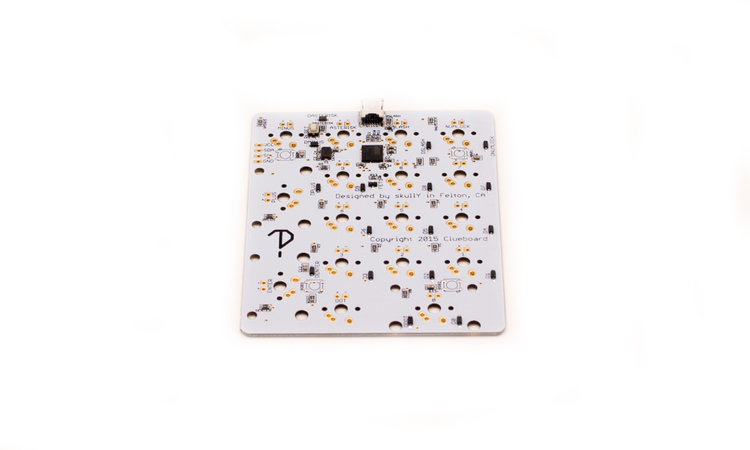 |
| 4 | |||
| 5 | A basic 17 key numpad PCB. | ||
| 6 | |||
| 7 | * Keyboard Maintainer: [Zach White](https://github.com/skullydazed) | ||
| 8 | * Hardware Supported: Cluepad PCB 1.0 | ||
| 9 | * Hardware Availability: [clueboard.co](https://clueboard.co/) | ||
| 10 | |||
| 11 | Make example for this keyboard (after setting up your build environment): | ||
| 12 | |||
| 13 | make cluepad-default | ||
| 14 | |||
| 15 | See [build environment setup](https://docs.qmk.fm/build_environment_setup.html) then the [make instructions](https://docs.qmk.fm/make_instructions.html) for more information. | ||